Просмотр новости
Найдите то, что Вас интересует
 Спутники
 РН
РН SpaceX
 Роскосмос
 NASA
NASA
СпутникиРНSpaceXРоскосмосNASAGet Header and Footer Builder with ColorMag Free v4.0.0 and ColorMag Pro v5.0.0! Update now and experience the change! We’re thrilled to announce the release of ColorMag Free v4.0.0 and[…]
Get Header and Footer Builder with ColorMag Free v4.0.0 and ColorMag Pro v5.0.0! Update now and experience the change!
We’re thrilled to announce the release of ColorMag Free v4.0.0 and ColorMag Pro v5.0.0, which introduces the powerful Header Footer Builder feature.
This update brings advanced flexibility, controls, and customization options to your WordPress site.
By following this guide, you can transition smoothly to the new builder and unlock the full potential of your ColorMag theme.
Let’s dive into what this means for you and how to make the most of these new capabilities.
Table of Contents
Before you start exploring this powerful new tool, please consider these crucial points:
For a seamless transition, please read this article carefully or contact our support team for assistance.
The star of this update is undoubtedly the new Header and Footer Builder. This feature allows you to create custom headers and footers using a visual, drag-and-drop interface.
Here’s what you can experience with the builder:
Header BuilderHeader Builder comes with a visual drag-and-drop interface. You can now easily customize your header layout without touching code.
Here are the key components that come with the Header builder:

You can now personalize your site’s title and logo by changing the colors and typography and enabling/disabling it as needed.
Footer BuilderFooter Builder has flexible layout options, including multi-row and multi-column footer designs.
Here are the key components offered by Footer Builder:

Best of all, editing your copyright text is as easy as ever.
Enhanced CustomizationYou can now effortlessly fine-tune each component’s colors, typography, padding, margins, and more. Here’s what you get:
If you’ve used a Child Theme to customize your header and footer styles, this update might affect certain aspects of your existing design.
Don’t worry—we’ve taken steps to ensure the transition is as smooth as possible for child theme users.
Please contact our support team for assistance in smoothly transforming from a static header to a new header-footer builder.
Also, with the new builder, you may no longer need a child theme for header and footer customizations.
For existing ColorMag users, here’s how to smoothly transition to the new Header and Footer Builder:
Step 1: Update Your ThemeEnsure you’ve updated ColorMag free to v4.0 and Pro to v5.0 or later.
To confirm, visit your dashboard and navigate to Appearance >> Themes. You’ll see the notification with the Update now link.
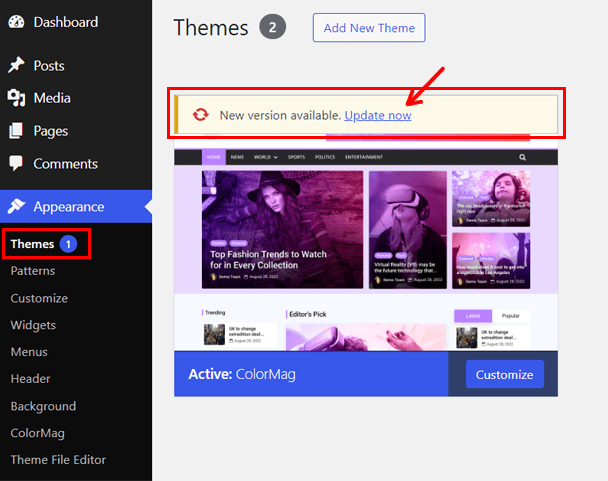
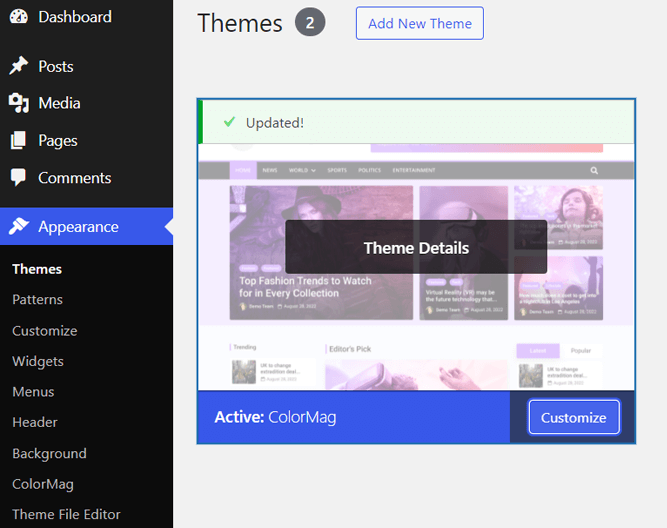
Click on the link, and the theme will be updated.
 Step 2: Enable Builder Through Theme Customizer
Go to Appearance > Customize in your WordPress dashboard.

Click on Header & Navigation.

Now, toggle on that “Enable Builder” option.

You will now see an important notice that we’ve mentioned above. Please read them carefully and hit the Continue button to get started.

Your site now has Header and Footer Builder enabled.
Step 3: Explore Builder Components for Header and FooterNext, click on Header Builder to see all the available builder components.

You can drag and drop the elements on your header and customize them. On the left, you’ll see all the new header builder components.

Similarly, for Footer Builder, click on the tab and explore all the components.
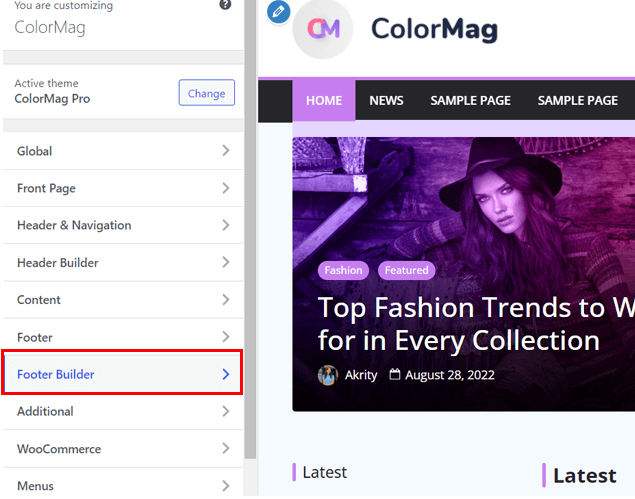
From footer builder, you can also easily edit the number of rows and change the style. Most importantly, you can edit the copyright on the footer right from the Footer Builder.

You can see the changes right on your screen as you change the footer and header.
Once you’re satisfied with everything, hit the Publish button.
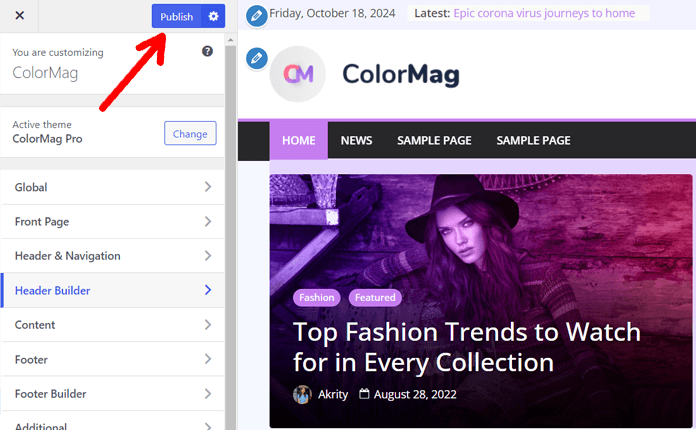
If you’re unsure about making drastic changes, start small. Modify one section at a time and publish when you’re satisfied.
If you get stuck on any of the steps, feel free to reach out to our support team.
Here’re some tips for using the ColorMag’s Header and footer Builder:
We’ve created this new feature based on user feedback and requests. So, we’re excited to see how you’ll use it to enhance your websites.
We welcome your thoughts and feedback as we continue to grow and improve ColorMag.
For in-depth guides on using ColorMag’s Header and Footer Builder, check out our detailed documentation:
We hope you enjoy these new features and enhancements. The Header Footer Builder is designed to give you more control and flexibility, making it easier than ever to create a stunning website.
For detailed instructions and troubleshooting tips, refer to the ColorMag documentation or reach out to ColorMag support for assistance.
| # | Наименование новости | Тональность | Информативность | Дата публикации |
|---|---|---|---|---|
| 1 | New FDM Website Design and Feature Voting Page Launched | 0 | 7.27 | 19-05-2026 |
| 2 | Introducing PDFDraft: A Free Visual PDF Builder Plugin for WordPress | 0 | 14.22 | 27-05-2026 |
| 3 | GIMP Making Progress On New Project File Format After Nearly 30 Years With XCF | 0 | 12.84 | 16-08-2026 |
| 4 | David Cavins updated the Releases page, on the BuddyPress Codex | 0 | 2 | 07-07-2026 |
| 5 | Updated CodeIgniter to 4.7.4 | 0 | 5 | 08-07-2026 |
| 6 | finance/py-stripe - 6.7.0 | 0 | 44.1 | 15-08-2026 |
| 7 | 7 New Camera Raw Features & Updates You Might Have Missed (v18.5) | 0 | 8.62 | 04-08-2026 |
| 8 | Free Download Manager 6.34 Released | 0 | 13.28 | 19-05-2026 |
| 9 | How to Build a Website: A to Z Guide for Beginners #webdesign | 0 | 5.92 | 31-07-2026 |