Просмотр новости
Найдите то, что Вас интересует
 Спутники
 РН
РН SpaceX
 Роскосмос
 NASA
NASA
СпутникиРНSpaceXРоскосмосNASAIf you installed the new Firefox 157 update, you probably noticed your browser got a brand-new look. This is part of Mozilla’s new Nova design for Firefox, which it began testing publicly a few months ago. Firefox fans have already shared their mixed opinions on the design during the testing phase, with many demanding that […]
The post Don’t like the new Firefox Nova UI? Here’s how to disable it appeared first on PiunikaWeb.
If you installed the new Firefox 157 update, you probably noticed your browser got a brand-new look. This is part of Mozilla’s new Nova design for Firefox, which it began testing publicly a few months ago.
Firefox fans have already shared their mixed opinions on the design during the testing phase, with many demanding that the company abandon the project. But the little ray of hope is long gone, and the design is here to stay.
It feels a bit like the reaction when people spotted that experimental purple orb logo earlier this year. Whenever Mozilla touches the interface, feathers get ruffled, but the floating tabs and chunky padding in Nova seem to have struck a raw nerve.
Luckily, you don’t need to put up with the new Nova design if you feel like it’s not for you. The company has left users an escape hatch in the browser’s advanced preferences. The best part is that it takes just a few clicks to disable the new look. So if you’re ready to go back to the old Firefox UI, perform the following steps:
First, open a new tab in Firefox, type about:config into the address bar, and press Enter.
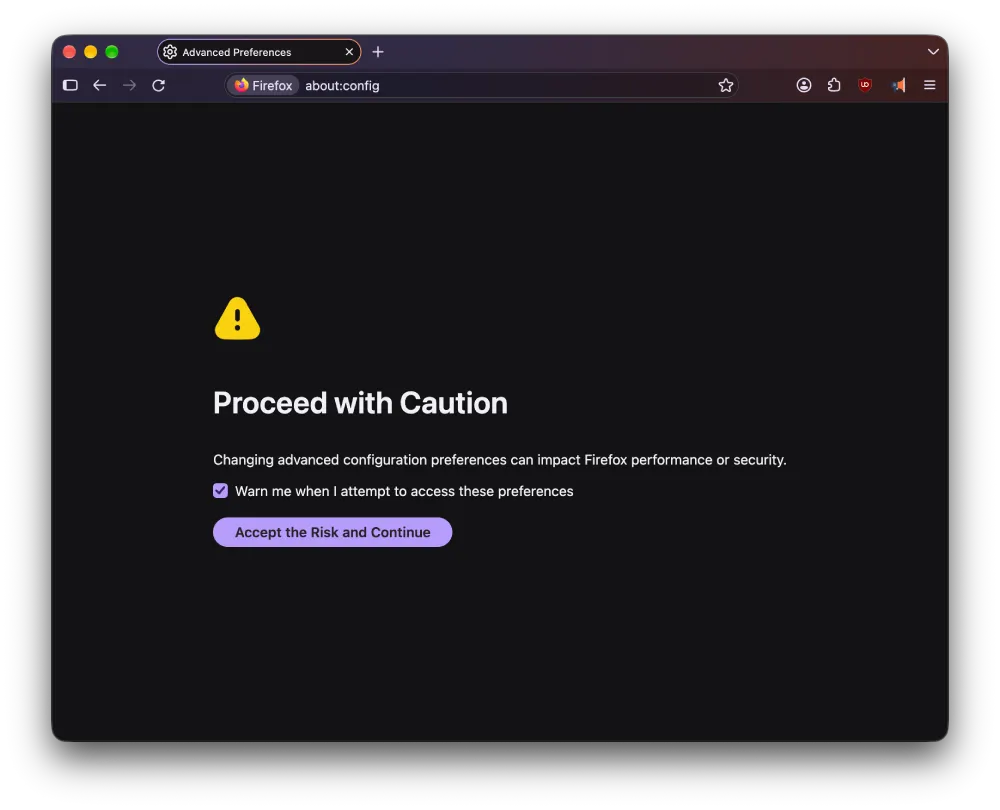
The browser will throw up a warning screen telling you to proceed with caution because editing advanced settings can impact performance. Just click the blue button that says “Accept the Risk and Continue.”
Once you’re in the preferences window, type “Nova” into the search bar and wait for the results to populate. You should see one entry labeled browser.nova.enabled, and it will be set to true by default.
Double-click that line or click the toggle button on the far right to change the value to false.
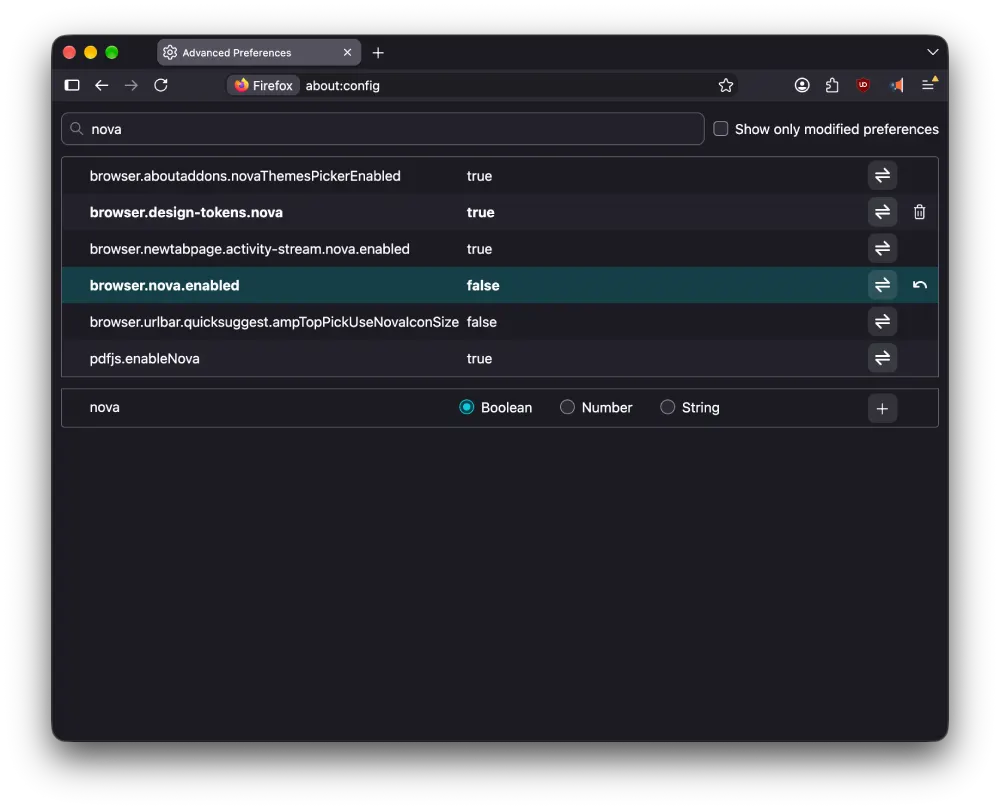
That’s pretty much it. You should see the UI revert back to the old Firefox design instantly. You don’t need to restart your machine for the change to take effect, though it’s still a good idea to do so just in case there are any visual glitches.
If you change your mind later and want to try the new Nova design again, you can always set the value back to true.
Just keep in mind that these preference toggles don’t stick around forever. If Mozilla removes the old look completely in the future, the trick won’t work anymore. So take advantage of it while you can.
Meanwhile, if you’re looking for a Firefox alternative, Floorp browser also implemented the Firefox 157 base with a new update, but it disabled the new UI by default.

We stand out from the tech-media crowd because we break news stories; we mainly bring you stuff that you won’t find anywhere in the mainstream tech media. Our stories have been picked up by some of the world’s most popular websites and media outlets—more info is available here.
| # | Наименование новости | Тональность | Информативность | Дата публикации |
|---|---|---|---|---|
| 1 | Mozilla обновила дизайн браузера Firefox | 0 | 7.16 | 01-10-2026 |
| 2 | Firefox users report crippling YouTube RAM spikes, but there’s a potential solution | 0 | 18.88 | 01-10-2026 |
| 3 | Mozilla Brings Back Compact Mode In Biggest Firefox Redesign In Years | 0 | 6.22 | 30-09-2026 |
| 4 | Firefox's biggest update in years launches tomorrow. Here's how to get it early | 0 | 12.18 | 28-09-2026 |
| 5 | Mozilla обновила Firefox Компания обновила цвета браузера, иконки и темы, ... | 0 | 6.6 | 29-09-2026 |
| 6 | Mozilla обновила Firefox Компания обновила цвета браузера, иконки и темы, ... | 0 | 6.6 | 29-09-2026 |
| 7 | Mozilla обновила Firefox — всем пользователям стал доступен новый интерфейс с округлой формой вкладок | 0 | 12.84 | 29-09-2026 |
| 8 | Релиз Firefox 157 с модернизированным интерфейсом пользователя | 0 | 22.99 | 29-09-2026 |
| 9 | Firefox 157 Now Available With Visual Refresh, WebRTC Hardware AV1 Decode | 0 | 19.3 | 28-09-2026 |
| 10 | Orion browser v1.1.3 update fixes address bar searches, vanishing bookmark folders, and more | 0 | 16.04 | 29-09-2026 |