Просмотр новости
Найдите то, что Вас интересует
 Спутники
 РН
РН SpaceX
 Роскосмос
 NASA
NASA
СпутникиРНSpaceXРоскосмосNASAHave a question that has not been answered before? Feel free to flick us an email at hello@piwik.org and we shall pop the answer up here for all to see. Thanks!
The post Integrate Silktide consent manager CMP with Matomo appeared first on Analytics Platform - Matomo.
This guide provides general technical implementation advice. It does not constitute legal advice. Consult with a qualified privacy professional to ensure full compliance with applicable laws.
Website owners are responsible for their website’s compliance with privacy laws. This includes responsibility for collecting and retaining a log of their visitors’ valid tracking consents where required.
A Consent Management Platform (CMP) helps website owners manage visitor consent for cookie-based and cookieless tracking. It typically presents visitors with a consent banner explaining data processing activities and allows them to accept or decline specific purposes, such as Analytics or Marketing.
You can integrate a consent manager with Matomo using the Matomo tracking code or Matomo Tag Manager.
Matomo supports three tracking approaches, depending on your organisation’s legal requirements and tracking needs:
This guide explains how to configure Consent-based tracking and Adaptive tracking using the Matomo tracking code. If you are using Tag Manager, follow the Silktide and Matomo Tag Manager integration guide.
Before you startAnalytics is enabled.<head> tag. Keep its stylesheet, external JavaScript file, style overrides, and window.silktideConsentManager.init({...}) call together.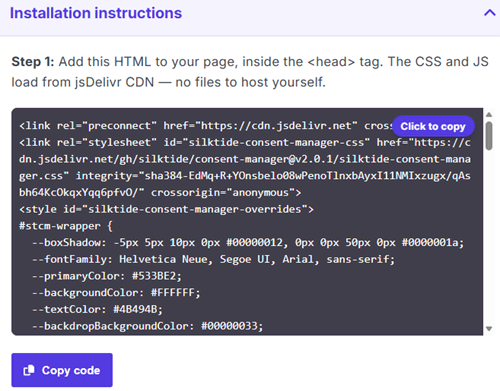
init() call.Analytics category inside your existing init({...}) configuration. required: false, which allows visitors to reject consent.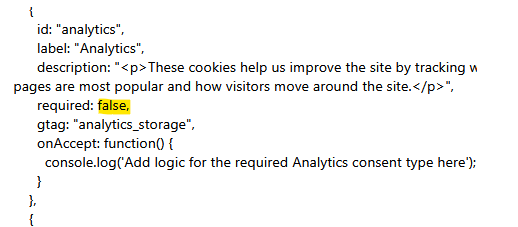
onAccept: function() below the consent category settings:required: false,
// Add the function
onAccept: function() {
updateMatomoTrackingConsent(true);
},
onReject: function() {
updateMatomoTrackingConsent(false);
}
In regions with strict privacy and ePrivacy laws, such as the EU or UK, websites must obtain explicit consent before collecting analytics data. Consent-based tracking ensures that no tracking occurs until a website visitor actively provides consent.
This method can operate in either cookieless (JavaScript-based) or cookie-based mode, but tracking is only activated after the visitor gives consent. When consent is revoked or denied, any existing Matomo cookies are removed from the visitor’s browser and tracking stops.
Install and modify the Matomo tracking code > Websites (or Measurables) > Tracking Code and select the website you want to track.
 _paq.push(['requireConsent']); before _paq.push(['trackPageView']). <head> tag on all the website pages you are tracking. <!-- Matomo -->
<!-- SAMPLE CODE - DO NOT COPY THIS -->
<!-- COPY THE TRACKING CODE FROM YOUR MATOMO DASHBOARD -->
<script>
var _paq = window._paq = window._paq || [];
_paq.push(['requireConsent']);
_paq.push(['trackPageView']);
_paq.push(['enableLinkTracking']);
(function() {
var u="//matomo/";
_paq.push(['setTrackerUrl', u+'matomo.php']);
_paq.push(['setSiteId', '1']);
})();
</script>
<script src="//matomo/matomo.js"></script>
<!-- End Matomo Code -->
Add the following function in the <script> element before your Silktide init({...}) call to ensure it is available when the consent callbacks run.
This connects the visitor’s Silktide consent choice to Matomo. When Analytics is accepted, it allows tracking. When consent is denied or withdrawn, it calls forgetConsentGiven so Matomo stops tracking.
<script>
  function updateMatomoTrackingConsent(accepted) {
  window._paq = window._paq || [];

  if (accepted) {
    window._paq.push(['setConsentGiven']);
  } else {
    window._paq.push(['forgetConsentGiven']);
  }
}
window.silktideConsentManager.init({

  // Keep your existing generated configuration.
});
</script>
After completing the configuration, test the setup to confirm that Matomo responds correctly when visitors accept or reject Analytics.
The Adaptive Tracking method can be used in regions where prior consent for analytics cookies or other trackers:
You can minimise the data you collect by configuring the Matomo privacy settings.
This method allows tracking to begin immediately in cookieless mode, with the option to request consent for cookie-based tracking. When the website visitor provides consent, tracking switches to cookie-based mode. If consent is denied or later revoked, tracking continues in cookieless mode.
Install and modify the Matomo tracking code > Websites (or Measurables) > Tracking Code and select the website you want to track. _paq.push(['requireCookieConsent']); before _paq.push(['trackPageView']). <head> tag on all the website pages you are tracking. <!-- Matomo -->
<!-- SAMPLE CODE - DO NOT COPY THIS -->
<!-- COPY THE TRACKING CODE FROM YOUR MATOMO DASHBOARD -->
<script>
var _paq = window._paq = window._paq || [];
_paq.push(['requireCookieConsent']);
_paq.push(['trackPageView']);
_paq.push(['enableLinkTracking']);
(function() {
var u="//matomo/";
_paq.push(['setTrackerUrl', u+'matomo.php']);
_paq.push(['setSiteId', '1']);
})();
</script>
<script src="//matomo/matomo.js"></script>
<!-- End Matomo Code -->
Add the following function in the <script> element before your Silktide init({...}) call to ensure it is available when the consent callbacks run.
This function connects the visitor’s Silktide cookie choice to Matomo. When Analytics cookies are accepted, it allows Matomo to use tracking cookies. When cookies are rejected or consent is withdrawn, it calls forgetCookieConsentGiven and deleteCookies to remove Matomo tracking cookies. Matomo may continue tracking without cookies if your configuration permits cookieless tracking.
<script>
  function updateMatomoCookieConsent(accepted) {
  window._paq = window._paq || [];

  if (accepted) {
    window._paq.push(['setCookieConsentGiven']);
  } else {
    window._paq.push(['forgetCookieConsentGiven']);
    window._paq.push(['deleteCookies']);
  }
}
window.silktideConsentManager.init({
  // Keep your existing generated configuration.
});
</script>
After completing the configuration, test the setup to confirm that Matomo responds correctly when visitors accept or reject Analytics.
This simple test confirms that the integration correctly respects regional privacy requirements and only uses cookies after consent is granted.
Disclaimer: The use of any third-party tools (plugins, extensions, platforms, APIs, widgets, etc.) is at your own risk. Matomo does not own, control, maintain or support any third-party tools that integrate with our product. We recommend checking your privacy setup is correctly configured across your environment when using any third-party tools.
Previous FAQ: How to integrate Complianz for WordPress CMP with Matomo
| # | Наименование новости | Тональность | Информативность | Дата публикации |
|---|---|---|---|---|
| 1 | Integrate Silktide consent manager CMP with Matomo Tag Manager | 0 | 8.03 | 30-09-2026 |
| 2 | Configure CNIL exemption opt-out tracking with a consent manager (CMP) | 0 | 10.41 | 30-09-2026 |
| 3 | Integrate the Matomo MCP Server with a third-party MCP client | 0 | 9.74 | 20-09-2026 |
| 4 | Ask Matomo | 0 | 10.77 | 14-09-2026 |
| 5 | Configure consent for marketing tags in Matomo Tag Manager | 0 | 8.03 | 04-09-2026 |
| 6 | Track Goals using server-side tracking | 0 | 12.93 | 03-09-2026 |
| 7 | Add custom metrics to Custom Reports | 0 | 8.49 | 04-10-2026 |
| 8 | Configure tracking for Crash Analytics | 0 | 9.15 | 28-09-2026 |
| 9 | Do Session Recordings capture browser form validation messages? | 0 | 8.59 | 18-09-2026 |
| 10 | End of manual certificate management: Why automation is becoming a cybersecurity requirement | 0 | 9.01 | 24-09-2026 |