Просмотр новости
Найдите то, что Вас интересует
 Спутники
 РН
РН SpaceX
 Роскосмос
 NASA
NASA
СпутникиРНSpaceXРоскосмосNASA
ChatGPT’s new Meetings plugin for Mac takes notes, creates personalized summaries and helps tackle the follow-up work.
(via Cult of Mac - Your source for the latest Apple news, rumors, analysis, reviews, how-tos and deals.)
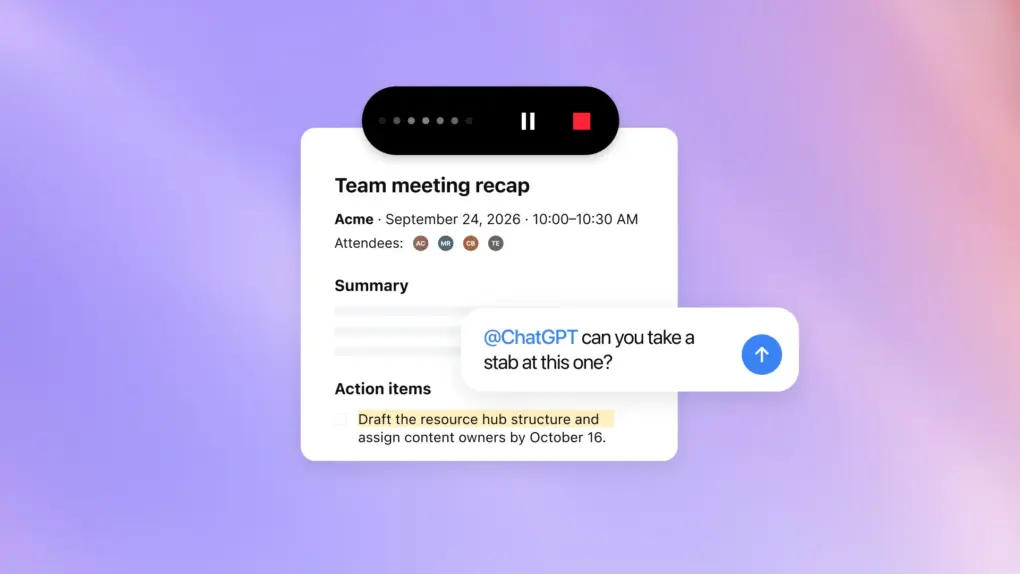 Let ChatGPT handle note-taking in your meetings now.
 ChatGPT for Mac can now act as a note-taking assistant in meetings. The new Meetings plugin takes notes during calls and provides a personalized summary afterward.
You can also share meeting notes with your team members or ask ChatGPT to take follow-up actions based on them.
ChatGPT turns meeting notes into next stepsThe ChatGPT for Mac app can already do more than just let you talk to OpenAI’s chatbot. Using its computer-use integration in ChatGPT Work, it can click, type and navigate Mac apps to complete tasks on your behalf.
Building on that, OpenAI is now turning ChatGPT’s Mac app into a meeting assistant. It works with online calls and in-person discussions, capturing the conversation and providing a personalized summary and suggested action items afterward. It does all this without requiring a bot to join the meeting.
This addition makes ChatGPT a direct competitor to Granola, Wispr’s Notetaker and other AI-powered meeting note-taking apps for Mac.
Put ChatGPT to work in your next meetingYour next meeting comes with a note-taker who can help with the follow-up.
The Meetings plugin takes notes for you and saves a personalized summary and next steps in ChatGPT Space, based on what ChatGPT knows about you and the work you’ve done together.
Keep notes private or… pic.twitter.com/BA6SkUYK11
— ChatGPT (@ChatGPT) October 6, 2026
The Meetings plugin combines the transcript, your own notes, and relevant information from connected apps to provide a personalized summary. This is what makes the Meetings plugin different from ChatGPT’s Record feature, which can already transcribe and summarize meeting and voice notes.
For example, you can ask ChatGPT to draft a follow-up email or update a project plan based on what everyone discussed. It saves the summaries and action items in ChatGPT Space, where you can keep them private or share them with your team.
To make ChatGPT act as your personal note-taker in meetings, install the Meetings plugin in the ChatGPT app’s sidebar and complete the initial setup process.
After that, the next time you are in a meeting, ChatGPT will automatically surface a prompt to start the recording.
The plugin uploads your audio to OpenAI’s servers for processing, but the company says it deletes the audio from your Mac and its servers once your notes are ready.
For now, the Meetings plugin in ChatGPT works on Mac, with iOS, Android, and Windows support coming soon. Meetings is currently available in beta for Pro and Business users.
Rajesh has been writing about consumer technology for over a decade, with a strong focus on iPhones, Macs and Apple’s ecosystem. He enjoys digging into Apple software updates, hardware changes, and discovering new Mac apps that make work faster and more enjoyable.
You can reach out to him at mail[at]rajeshpandey.me.

| # | Наименование новости | Тональность | Информативность | Дата публикации |
|---|---|---|---|---|
| 1 | ChatGPT just learned to watch everything you do on your Mac | 0 | 23.84 | 14-08-2026 |
| 2 | Stop guessing how to use AI. Master 6 top AI assistants for $15.99. | 0 | 23.58 | 07-10-2026 |
| 3 | Turn ChatGPT and Claude into serious work tools for just $19.99 | 0 | 22.81 | 24-09-2026 |
| 4 | Price drop: Unlock 20 top AIs for life for less than $60 | 6 | 6 | 08-07-2026 |
| 5 | 4 features that supercharge Notes in iOS 27 and macOS Golden Gate | 0 | 5 | 01-07-2026 |
| 6 | Grok Bot for iPhone and Mac lets AI agents do the work for you | 0 | 20.12 | 12-08-2026 |
| 7 | OpenAI Hands ChatGPT the Keys to iMessage on Mac | 0 | 9.14 | 22-08-2026 |
| 8 | This AI training bundle gets you fluent in Claude and ChatGPT for $29.99 | 0 | 21 | 12-09-2026 |
| 9 | OpenAI adds plug-in that gives ChatGPT more autonomy on your Mac | 0 | 8.22 | 24-08-2026 |
