Просмотр новости
Найдите то, что Вас интересует
 Спутники
 РН
РН SpaceX
 Роскосмос
 NASA
NASA
СпутникиРНSpaceXРоскосмосNASAConsider browsing a website and being met with a pop-up alerting you to an issue on your computer. The solution to this issue is as easy as it gets: pressing a hotkey, opening the Windows PowerShell window, and entering a command to fix your problem. All of these actions sound fairly complex but reasonable; you… Continue reading ClickFix Scams Explained: How Fake Error Messages Trick Windows Users
The post ClickFix Scams Explained: How Fake Error Messages Trick Windows Users appeared first on .
Summary: ClickFix scams employ fake errors, fake CAPTCHA scam screens, and update alerts to trick Windows users into running malware through a series of commands. ClickFix attacks exploit legitimate applications such as malicious PowerShell commands to infect machines with malware, steal user credentials, and breach accounts. Learn about ClickFix attacks and how you can safeguard your Windows machine against them.
Consider browsing a website and being met with a pop-up alerting you to an issue on your computer. The solution to this issue is as easy as it gets: pressing a hotkey, opening the Windows PowerShell window, and entering a command to fix your problem. All of these actions sound fairly complex but reasonable; you will definitely be tempted to try. But there is a twist: running such a command can infect you with malware, collect sensitive information from your computer, or give hackers access to it.
Such is the essence of ClickFix scams – a form of social engineering that involves tricking people into performing a harmful action on their own machine. The difference between these scams and other malware attacks is that they require user interaction. Since the user starts the process, certain classic methods of downloading may prove to be less effective. But there are ways to detect or even stop some elements of the attack.
FTC Consumer Alert About ClickFix malware and fake CAPTCHA scams Image credit – Unsplash
In June 2026, the Federal Trade Commission (FTC) in the United States issued a consumer alert regarding the threat posed by clickfix malware, which involve fake CAPTCHA scams designed to prompt victims to install malware on their computers themselves. The FTC described how the scam works, which involves mimicking a normal human verification process and asking victims to press Windows + R, then Ctrl + V, and Enter. This will not verify anything but will actually run a command copied secretly to the clipboard by attackers. Such schemes might allow hackers to steal email passwords and credentials for accessing online banks or other sensitive information. The FTC warns consumers never to run commands requested by a CAPTCHA scheme and suggests disconnecting an infected computer from the internet, scanning it for malware, and resetting potentially stolen passwords using another computer.
What Is a ClickFix Attack?ClickFix attack is a cyber threat that creates a fake error, security alert, verification message, or system problem and convinces users to take actions that will execute the malicious code. This name is derived from the core idea of such attacks, where a victim is promised to click a button or do some easy steps in order to fix something.
Contrary to software exploits, cybercriminals are not attacking the vulnerabilities directly but rather manipulate victims and get them to bypass security measures. ClickFixe malware can be found in malicious web pages, banners and advertisements, fake CAPTCHA scams, fake software download sites, and technical support pages.
For instance, a web page can show a message saying that the browser needs to be updated. Then, the site prompts the user to press Win + R, type some code, and hit Enter. The victim thinks that he or she is updating the browser, while the code will download and run a malicious payload. The key feature of ClickFix attack is that the victim performs actions that trigger the attack.
How to Spot a ClickFix Scam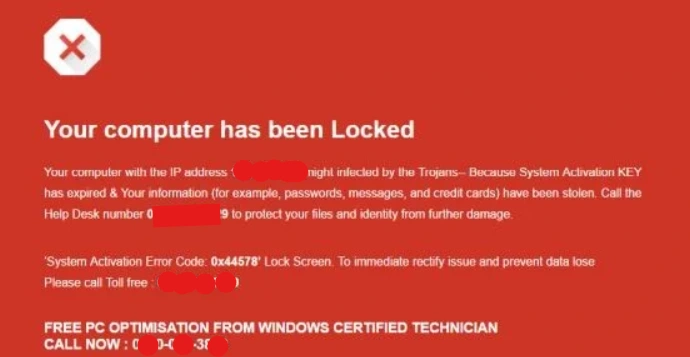
The scam website will likely try to convince you that you have to verify your identity, resolve a browser issue, install a particular element, or perform some security tests. Then it will ask you to launch Windows Run or enter malicious PowerShell commands.
Red flags to be aware of include:
Keep in mind that a legitimate CAPTCHA never asks you to run any Windows commands to prove that you are indeed human. If you encounter such instructions, do not do anything but visit the software manufacturer’s official website to check for any problems.
How Does the ClickFix Attack Work?Usually, the ClickFix attack involves certain steps that help to disguise any malicious actions as legitimate ones.
1. Display of a False Error NotificationThe attack starts with the appearance of a realistic-looking notification for the user. It may say that the page does not load, that a browser add-on is missing, that a document needs to be updated, or that a certain check did not pass. Attackers try to copy popular notifications and make the user respond quickly. Sometimes, such notifications appear on webpages and look like system notifications. In other cases, the notification mimics a CAPTCHA check or tech support instructions.
2. Instructions for the User Are ProvidedThese steps are opposed to requiring the user to download an ordinary installer. The most common are:
Use genuine Windows commands, which makes them look credible to those unaware of command-line techniques.
3. A Malicious Command Is ExecutedAfter running the command, it might connect to a server online, download extra files, run scripts, and/or install malware. The purpose of the payload could range from stealing credentials from browsers, stealing cookies used for authentication, installing a remote access tool, or establishing persistence on the target computer. The specific payload will depend on the type of ClickFix attack. Not all ClickFix attacks run malicious PowerShell commands and/or do not install applications immediately.
4. Attack Runs in the BackgroundThe erroneous web page may vanish, and/or the website will generate a confirmation message. Meanwhile, the malware operation will continue unnoticed. The user won’t notice anything out of the ordinary until someone accesses accounts without authorization or the computer starts acting weirdly.
ClickFix Attack: What Does It Really Look Like in Practice?Think about what happens if you open a website and see a message saying that your browser requires an urgent fix, followed by some instructions on how to do that using your keyboard (for example, Windows + R). It might look like a real CAPTCHA or an update message from some software.
By performing the required actions, you might be launching malicious code that will either download malware, steal your data, or give the attacker access to your machine. The tricky thing about such an attack is that you do not have to install something suspicious as a separate file. Instead, you do it yourself.
There could be different versions of these messages, but one thing is sure – the warning will be the same. It will be a message on the website, requesting you to launch something in a system tool to solve some issue or verify something.
Why Are ClickFix Attacks So Successful?ClickFix attacks are successful because they manipulate human psychology rather than depending on technical vulnerabilities alone.
This depends on the nature of the code that is run and what the criminals intend to achieve.
The fact that the computer system has been compromised by the scam known as ClickFix malware does not automatically mean that all these things would happen.
How to Safeguard Your Windows Computer from ClickFix ScamsThe best method is to identify any suspicious instructions before following them.
1. Don’t Paste Unknown Instructions into Windows
Identify any web page where you are asked to copy instructions and run them, especially if the instructions include using PowerShell, Command Prompt, or the Run window. Don’t follow any instructions just because a site says that running them will solve the problem or confirm your identity.
2. Identify Any Errors Using Official Sources
If a site states that Windows or your browser requires updates, visit the official website of the software company, or use the built-in function within the application to perform the update.
3. Keep Windows Security Up to Date
Update Windows regularly and keep Microsoft Defender Antivirus or any other security software up to date. Real-time scanning may prove helpful in identifying malware and suspicious activities. Nonetheless, security software is just one of many security layers and should not be considered a way to stop all attacks.
4. Avoid Administrator Account
Do not use an administrator account for day-to-day computer tasks. It may reduce harm caused by some of the attacks but will not stop all attacks anyway. Never approve administrator prompts on the web page’s suggestion alone. Although a standard account will be able to mitigate any attacks that take place in terms of regular work, malicious commands can still run under the available privileges of the user.
5. Do Not Trust Browser Pop-Ups
A website should not be taken for trustworthy simply because its alert message looks like the Windows alert message. Close pop-up alerts and do not follow their instructions. Updates for browsers should be done via the browser itself, not via prompts from some web page.
6. Be Cautious of Strange Commands
Any commands that download files from strange internet locations, run code that is encrypted, or hide processes should be viewed with special suspicion. It is not necessary for you to know all of the commands to keep yourself secure. However, if a website asks you to run any code that you didn’t ask for, don’t do it.
What Occurs When ClickFix Command is Executed by Accident?When the ClickFix command is executed, different kinds of dangers may arise depending on what exactly the command entails. These include downloading malware onto the computer, stealing the saved credentials, gathering sensitive information or establishing remote access. It could also include an attempt to access work accounts.
Nevertheless, viewing a questionable website does not necessarily imply that the computer will get infected. This depends on whether the command was executed, its nature and the success of the malicious activities.
In case one pastes an unknown command and executes it, then there is a serious threat which should be handled accordingly. First, the computer should be disconnected from the internet connection, avoid entering any passwords and take action to secure the possible compromised accounts using another safe computer.
What Should You Do If You Have Already Followed ClickFix Instructions?| Situation | Recommended guidance |
| You have viewed the webpage, but nothing was executed | Close the webpage without executing or copying anything. If you have downloaded any file or launched any program, take action. |
| You have pasted a command or executed it | The computer may be considered compromised. You should disconnect the computer from the network and get professional help on how to handle this situation. Scans including running Microsoft Defender Offline are necessary. |
| You entered a password or use this PC for work | From another computer, change passwords, revoke sessions and use multifactor authentication. |
Scams associated with ClickFix are a good example of how cybercriminals may make the task of fixing computers dangerous by exploiting people’s trust in Windows and convincing them to enter commands manually.
The main rule is quite simple: one shouldn’t trust any website that asks them to input unknown commands to fix their computer, check their identity, or get access to the page in question. One should keep Windows up-to-date, use legitimate sources for updates, install all available security programs, and think twice before performing any unexpected actions on a website.
Frequently Asked Questions| # | Наименование новости | Тональность | Информативность | Дата публикации |
|---|---|---|---|---|
| 1 | Local AI vs Cloud AI: Which Is Better for Your PC | 0 | 6.6 | 16-10-2026 |
| 2 | How to Script AI Agent Tasks With Codex, Gemini (agy), and Claude | 0 | 7 | 01-07-2026 |
| 3 | How to Secure Your Files Against Ransomware and Accidental Deletion | 0 | 7.78 | 15-10-2026 |
| 4 | Is Windows Defender Good Enough to Protect Windows 10 or 11? | 0 | 12.35 | 02-09-2026 |
| 5 | Орфографические ошибки и низкие цены: эксперты назвали признаки фишинговых сайтов | 0 | 8.62 | 27-08-2026 |
| 6 | AI Agents Are Wasting Your Tokens, Here’s How to Fix Long Document Pipelines | -2 | 6 | 29-06-2026 |
| 7 | Reαd carefully: how to spot – and avoid – a homoglyph attack | 0 | 6.64 | 20-09-2026 |
| 8 | Malware problem (fixed) | 0 | 9.11 | 29-07-2026 |
| 9 | Россиян предупредили о новой схеме мошенничества с якобы взломом "Госуслуг" | 0 | 8.37 | 24-08-2026 |