Просмотр новости
Найдите то, что Вас интересует
 Спутники
 РН
РН SpaceX
 Роскосмос
 NASA
NASA
СпутникиРНSpaceXРоскосмосNASAiOS 27 has brought a lot of new features to the iPhone, but one of the things that has made the biggest difference to my experience of the device as a phone actually dates back a year earlier.
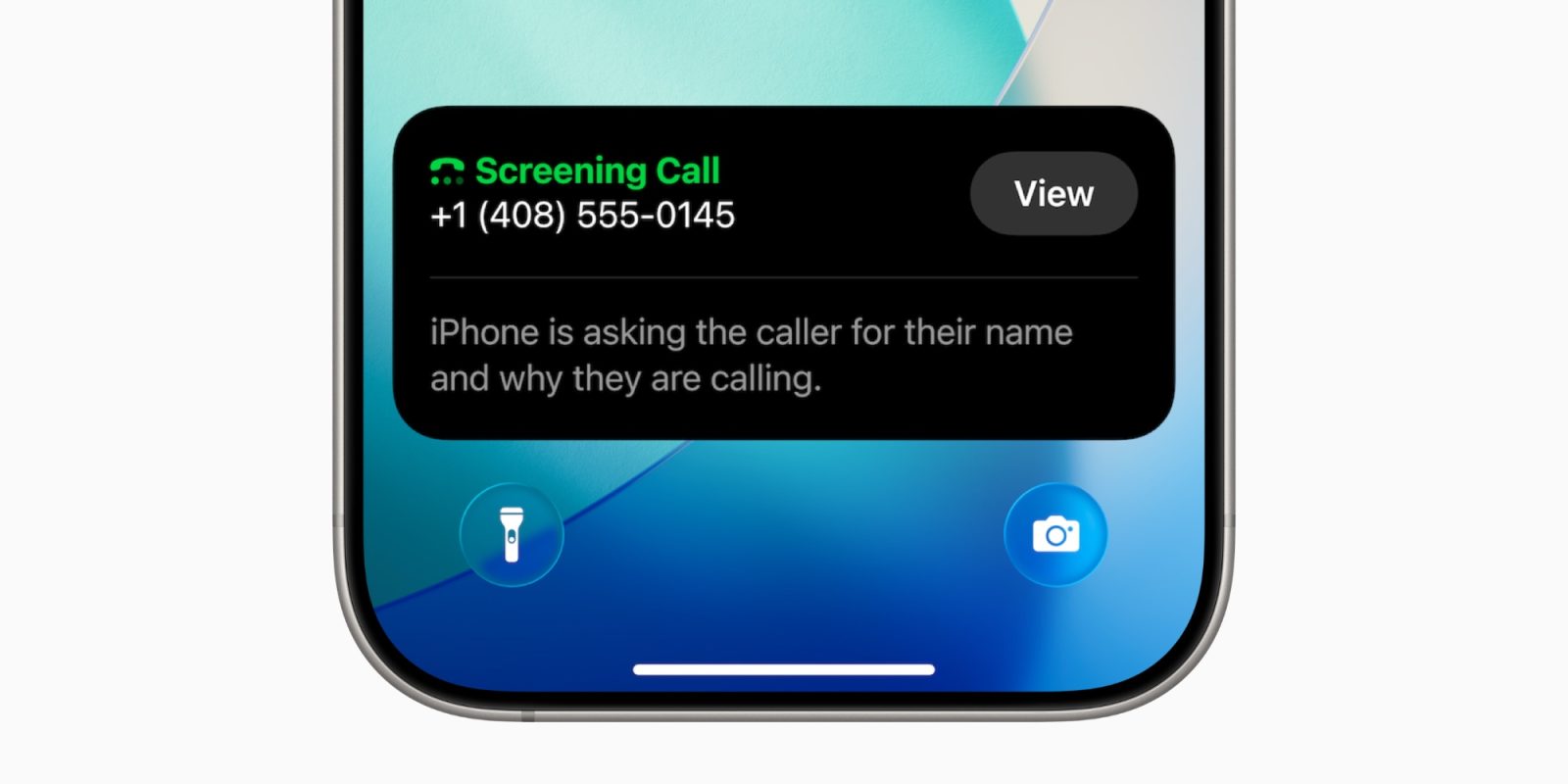
Apple introduced Call Screening to the Phone app in iOS 26, but I only started using it a few months ago – and the feature has protected me from a growing number of spam and spam calls …
more…
iOS 27 has brought a lot of new features to the iPhone, but one of the things that has made the biggest difference to my experience of the device as a phone actually dates back a year earlier.
Apple introduced Call Screening to the Phone app in iOS 26, but I only started using it a few months ago – and the feature has protected me from a growing number of spam and spam calls …
I’ve tried to be reasonably protective of my phone number, only providing it when it is not only demanded by an organization, but where I accept that it will be useful for them to have it. In many cases where a web form insists on it, I’ve used a fictitious number.
The UK’s telecoms regulator actually provides a range of 1,000 mobile numbers that have never been allocated so I can be sure my fake number won’t lead to someone else being spammed.
However, I’ve owned my mobile number for literally decades now, so it’s unavoidable that it has made its way onto some marketing lists, and there are also companies that use robocallers to dial random numbers. I haven’t been bothered by many of these historically, but for some reason there was a significant uptick earlier this year.
When Apple introduced the call screening feature last year, I was concerned about missing genuine calls, so didn’t immediately enable it. However, I did so earlier this year, selecting the Ask Reason for Calling option, and I have to say I highly recommend it.
The main spam/scam calls I received were from companies pretending to be my mobile carrier. I think some are likely third-party resellers hoping to trick me into switching network, while others are either trying to obtain payment details or carry out more general data harvesting. I’ve never let any of these calls get far enough to find out, but it reached the point where I was getting at least one of these calls every week. I’d also been getting a growing number of job scam calls.
Since switching on the feature, not a single one of these has got through to me. I think in the vast majority of cases, they immediately hang up when they get the automated response, while a few of them have bothered to give me their claimed reason for the call, and it’s been immediately obvious that I should reject it.
I also haven’t seen any indication of anyone genuine failing to reach me. I’ve had a number of genuine calls get filtered by the screening feature, but all of these have explained who they are and the reason for the call, and I’ve then been able to answer it.
If you don’t currently have Call Screening enabled, I highly recommend it. Open the Settings app, scroll down to the App section, select Phone, and then scroll down to Screen Unknown Callers.


FTC: We use income earning auto affiliate links. More.

| # | Наименование новости | Тональность | Информативность | Дата публикации |
|---|---|---|---|---|
| 1 | Your iPhone will soon call your scammer’s bluff — here’s how | 5 | 7 | 04-07-2026 |
| 2 | Here’s how to turn any iPhone into a dumb phone for you or your kids | 0 | 5 | 06-07-2026 |
| 3 | Apple Added A New Scam Prevention Feature With iOS 27 | 0 | 21.68 | 18-09-2026 |
| 4 | iOS 27 arrives with a smarter Siri and fixes you’ll actually notice | 0 | 24.28 | 14-09-2026 |
| 5 | Easy way to record and transcribe your iPhone calls | 0 | 18.38 | 27-04-2026 |
| 6 | Apple releases fourth iOS 27.2 developer beta for iPhone [U: Public] | 0 | 19.65 | 13-10-2026 |
| 7 | Here’s why I think the AI photo features in iOS 27 are so well considered | 7 | 6 | 18-06-2026 |
| 8 | 9to5Mac Daily: May 27, 2026 – New anti-theft iPhone features, more | 0 | 2 | 27-05-2026 |
| 9 | 9to5Mac Daily: June 15, 2026 – More iOS 27 features and changes | 0 | 3 | 15-06-2026 |